BLUF (Bottom Line Up Front): SpaceX’s $499 Starlink Mini dish can deliver 100 to 220 Mbps satellite internet from an open apartment balcony, provided it has an unobstructed 110-degree sky cone. However, recessed concrete overhangs, low-E window glass, and urban high-rises frequently block Low Earth Orbit (LEO) handoffs.
For apartment renters stuck with a monopolized building ISP charging $85 a month for sluggish cable—or remote workers who split their time between a city flat and off-grid travel—SpaceX’s backpack-sized Starlink Mini looks tempting. Priced at $499 USD for the hardware kit and paired with either the $50/month Roam 50GB plan or the $165/month Roam Unlimited tier, the laptop-sized phased-array terminal combines a satellite transceiver and a Wi-Fi router into a single 2.43-pound weatherproof enclosure.
Before spending $500 on hardware, however, urban apartment dwellers need to understand a fundamental physics constraint: unlike a cellular 5G home internet gateway that can catch reflected tower signals inside a living room, a Starlink terminal must actively track fast-moving Low Earth Orbit (LEO) satellites hurtling overhead at 17,000 mph. Here is how the Starlink Mini actually performs on apartment balconies, by windows, and against fiber-optic broadband.
Does the Starlink Mini Actually Work on an Apartment Balcony?
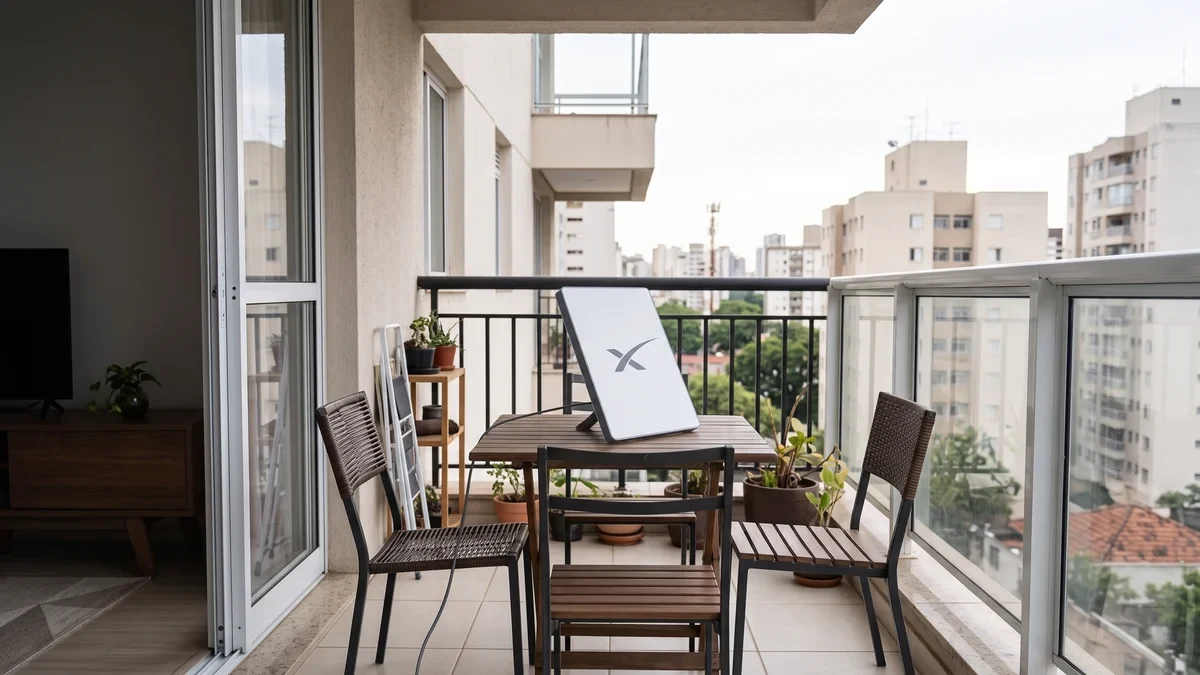
Yes—the Starlink Mini can work reliably in an apartment, if and only if your balcony or patio offers a clear, wide-angle view of the sky. Unlike legacy geostationary satellite dishes that point at a single stationary spot above the equator, SpaceX’s electronically steered phased-array antenna continuously switches beams between satellites across a roughly 100-to-110-degree field of view.
“Even a narrow overhead obstruction—such as an upper-floor concrete balcony slab, a neighboring high-rise tower, or dense tree foliage—will cause brief micro-dropouts during real-time video calls and online gaming whenever the active satellite passes behind that barrier,” SpaceX’s Starlink engineering documentation explains.
In real-world multi-family building deployments, apartment layouts fall into three distinct signal tiers:
- Top-Floor or Uncovered Open Balconies (Best Case): Terraces and uncovered balconies facing the primary orbital tracking direction (northward in the continental United States) achieve 98%+ uptime, delivering 100 Mbps to 220 Mbps downloads and 25 ms to 45 ms latency.
- Recessed Balconies With Overhead Concrete Slabs (Moderate Risk): If your balcony is tucked deep under the floor above you, roughly 40% to 60% of the vertical sky cone is clipped. Web browsing and 4K buffered streaming on Netflix or YouTube will still work, but Zoom calls, VoIP, and competitive gaming will freeze for 3 to 12 seconds every few minutes.
- Urban Canyons Surrounded by Taller Towers (High Risk): Even on the 15th floor, if 30-story buildings sit directly across a narrow street, the horizon blockage often prevents stable satellite handoffs altogether.

Built-In Wi-Fi Router Range: Will 1,200 Sq. Ft. Reach Every Room?
To keep power draw down to an average of just 20 to 40 watts (allowing the dish to run off a 100W USB-C PD portable power bank), SpaceX integrated a dual-band Wi-Fi 5 (802.11ac, 3×3 MU-MIMO) router directly inside the Starlink Mini dish housing rather than shipping a separate indoor router unit.
According to official SpaceX specifications, the integrated router covers up to 1,200 square feet (112 m²). In an apartment setting, however, there is a catch: because the dish must sit outside on the balcony to see the sky, your Wi-Fi signal must immediately punch through an exterior sliding glass door and structural wall before reaching your living room, office, or bedroom.
- Drywall & Wood-Frame Apartments: Expect reliable 5 GHz speeds in rooms adjacent to the balcony and usable 2.4 GHz coverage up to 750–900 square feet.
- Reinforced Concrete, Brick & Low-E Glass: Modern energy-efficient sliding doors coated with metallic Low-E film and poured-concrete interior walls attenuate 5 GHz Wi-Fi signals by 12 dB to 25 dB. In a 1,000-square-foot concrete apartment, speeds in the back bedroom can easily drop below 15 Mbps unless you add a wired Ethernet mesh node or a $199 Starlink Gen 3 router.

Open Balcony vs. Enclosed Sunroom vs. Indoor Window Placement
Many renters ask whether they can simply prop the Starlink Mini on a table inside the apartment next to a large window. In 90% of urban apartments, indoor window placement fails as a primary internet connection for three engineering reasons:
- Clipped Zenith Angle: A dish sitting indoors behind a vertical window can only see a narrow slice of the side horizon—it is completely blind to satellites passing directly overhead through your ceiling.
- Low-E Glass RF Attenuation: Most multi-unit residential buildings built or renovated after 2010 use Low-Emissivity (Low-E) double-pane glass containing microscopic metal oxide layers that reflect Ku-band (12–18 GHz) radio frequencies.
- Enclosed Glass Balconies: If your balcony is enclosed with frameless glass curtains, sliding the panels open while using the internet dramatically reduces packet loss compared to shooting through closed glass panes.
📡 Want Real-World Hardware & Connectivity Benchmarks?
Join 42,000+ US network engineers, remote workers, and hardware enthusiasts who read the free Silicon Dispatch Daily Brief for unvarnished RF testing and silicon analysis:
👉 Subscribe to Silicon Dispatch Free (Choose Your Hardware Track) →

How to Test Your Apartment Balcony Before Buying ($0 App Trick)
You do not need to spend $499 to find out whether your apartment balcony has enough sky visibility. SpaceX includes a free, camera-based AR obstruction scanner inside the official Starlink app for iOS and Android:
- Download the free Starlink app from the Apple App Store or Google Play Store (no account or hardware purchase required).
- Walk out to your balcony and stand at the exact railing or corner where you plan to mount the Starlink Mini.
- Tap Check for Obstructions on the app’s home screen and hold your phone at the exact height and position the dish will occupy.
- Slowly pan your phone camera across the sky dome to fill in the green dot map. Within 60 seconds, the app will calculate your exact obstruction percentage and warn you if “Frequent interruptions” are expected for video calls or gaming.

HOA, Condo Boards, and US Tenant Rules (FCC OTARD Protection)
Even if the Starlink app gives your balcony a green light, building rules matter. In the United States, the Federal Communications Commission’s Over-the-Air Reception Devices (OTARD) Rule (47 C.F.R. § 1.4000) protects tenants and condo owners who install satellite dishes under 39.37 inches (1 meter) in diameter—which easily covers the compact 11.75 x 10.2-inch Starlink Mini.
However, federal protection comes with strict boundaries:
- Protected Exclusive-Use Areas: Your landlord or HOA cannot stop you from placing the Starlink Mini on a tripod, weighted base, or non-destructive clamp inside a balcony, patio, or terrace reserved exclusively for your unit.
- Unprotected Common Areas: You cannot bolt a mount into the building’s exterior brick facade, hang the dish outside the balcony railing over a public sidewalk, or install equipment on the shared condominium roof without written management permission.

Starlink Mini vs. Fiber Optic Broadband: Full Apartment Comparison
How does the Starlink Mini stack up against standard urban fiber-to-the-home (FTTH) or 5G Fixed Wireless Access in 2026? Here is the side-by-side breakdown:
The Verdict: When Is Starlink Mini Worth It for Apartment Renters?
If your apartment building already has reliable fiber-optic service for $60 to $80 a month, buying a $499 Starlink Mini to use strictly as your primary home ISP does not make financial or technical sense—fiber delivers 5x the bandwidth at one-fifth the latency without worrying about balcony overhangs.
However, the Starlink Mini shines in two specific apartment scenarios: first, as a dual-purpose travel and backup failover link for remote engineers who camp, RV, or need outage protection that runs off a USB-C battery pack; and second, for top-floor or penthouse renters in older buildings locked into overpriced DSL or congested coax cable where an open terrace provides a crystal-clear view of the sky.
Frequently Asked Questions (FAQ)
Can Starlink Mini work through a closed apartment window indoors?
Generally no. While basic radio waves can pass through standard single-pane glass, modern apartment windows use Low-E metallic coatings and angled overhangs that sever the 110-degree upward field of view required to track moving SpaceX Low Earth Orbit satellites continuously.
How much area does the Starlink Mini built-in Wi-Fi router cover?
SpaceX rates the Starlink Mini’s integrated Wi-Fi 5 (802.11ac) router for up to 1,200 square feet (112 square meters) in open air. Inside urban apartments with reinforced concrete or brick interior walls, real-world coverage typically drops to between 650 and 850 square feet without a mesh node.
Can an apartment HOA or landlord ban a balcony Starlink Mini dish in the US?
Under the FCC Over-the-Air Reception Devices (OTARD) Rule (47 C.F.R. Section 1.4000), US landlords and condo associations cannot prohibit tenants from placing a satellite dish under 1 meter in diameter inside an exclusive-use area like a private balcony, though drilling into common exterior walls or roof decks still requires building approval.
🚀 Stay Ahead of Every Silicon & Connectivity Breakthrough
Get our 3-minute daily briefing on satellite broadband tests, flagship silicon benchmarks, and practical hardware analysis—delivered straight to your inbox with zero fluff.