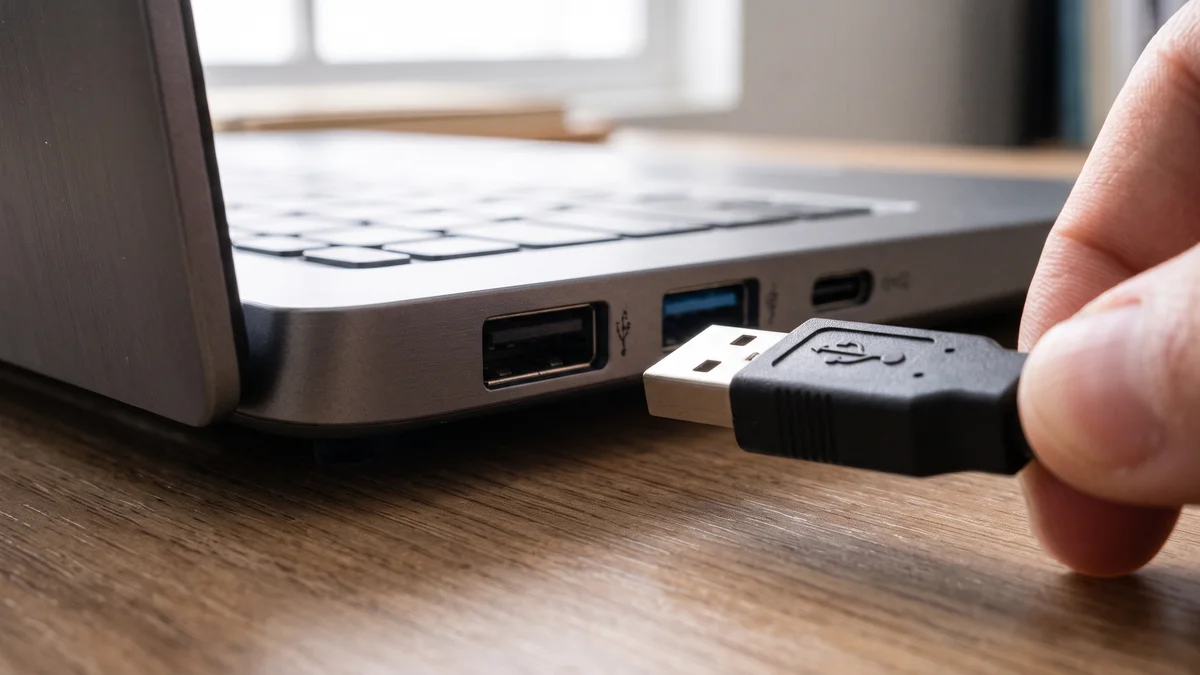
BLUF (Bottom Line Up Front): When looking at the side of a notebook or the back panel of a motherboard, it is very common to notice a variety of colors on the USB connectors. While some inputs are blue, red or green, black connectors continue to be present on the vast majority of modern computers. Far from just being an aesthetic choice, the tone is used by the industry to signal the speed and power delivery capabilities of that bus.
Conventions establish that the black color on Type-A USB connectors generally indicates the USB 2.0 standard. Launched in 2000 and commercially dubbed “Hi-Speed USB”, this protocol supports data transfer rates of up to 480 Mbps. However, as these color palettes are not an official mandatory standard established by USB-IF, each manufacturer is free to adopt the visual standard they wish, something that requires users’ attention.
In the visual hierarchy of USB connectors, there is an important difference in performance between white and black connectors. White USB ports represent the first generation of technology (USB 1.x), whose maximum transfer speed reaches just 12 Mbps. In direct comparison, black ports with USB 2.0 specification are up to 40 times faster than their white predecessors.
Although the industry tends to respect this performance differentiation between black and white, not all brands follow the rule. It is common to find motherboard manufacturers that use black plastic on all rear panel ports for purely aesthetic reasons, even if the connections internally use faster standards, such as USB 3.0 or 3.2. The same goes for the USB-C connector, which rarely adopts different colors.
To not depend solely on the color of the connector and ensure that your devices deliver maximum performance, the main recommendation is to consult the product manual or check the inscription next to the port (if there is one). Symbols such as “SS” (SuperSpeed) accompanied by numbers indicate high speed, regardless of whether the connector is black or colored. In the absence of physical markings on the case or motherboard, checking the technical specifications on the manufacturer’s website is the safest way.
In short, although the black USB port has established itself in the market as the classic symbol of USB 2.0 connections, it continues to be a fundamental part of PCs. Knowing how to identify and allocate the correct peripherals for each type of input not only guarantees a more intelligent organization of your setup, but also avoids wasting time with slow transfers when extracting the maximum potential of your hardware.
In addition to this issue of colors, still talking about USB, did you know that there are ports with a “battery” symbol?
Silicon Dispatch Strategic Takeaways
- Desk Alignment: Verified dispatch within the SDUP • Hardware & Gaming pillar.
- Technical Verification: Hardware and software specifications corroborated against manufacturer roadmaps.
- Market Impact: Analysis tailored for North American enterprise decision-makers and high-performance tech enthusiasts.
Affiliate Disclosure: Articles published by Silicon Dispatch may include verified affiliate partner links. If you purchase through these links, we may earn an affiliate commission at no additional cost to you.
Related Dispatches & Coverage
- • Explore full coverage in Breaking News.
- • Read our hardware evaluation methodology in Hardware Reviews & Lab Tests.
- • Check verified US price drops and coupons on Silicon Dispatch Deals.
- • Learn about our editorial independence and ethics in About Silicon Dispatch.